
(00)Correspondence
In Obscura, each letter is drafted, approved, numbered and filed in one record, so every number in your register can be explained.
- Template
- Approval
- Number
- Archive
The Correspondence module brings official letters, internal notes, memos and the incoming register into the same place as your documents. Each department follows one process, and leadership can trace every instruction back to the decision behind it.
(01)The long way round
Today, a letter's number usually comes from the last row of a spreadsheet that several people edit.
Someone reads the latest entry and types the next number, and two people numbering at the same time have to coordinate so that they do not use the same one. Someone then retypes the number, date and subject into the letter.
After the letter goes out, someone copies the final file into this year's folder, while approvals and follow-up stay scattered across email, chat and paper disposition sheets. Finding a letter is easy only when you already know its number.
Tracker.xlsx
| No. | Subject |
|---|---|
| 0011/STD/2026 | Vendor invitation |
| 0012/STD/2026 | Meeting notice |
| 0013/STD/2026 | Board memo |
| 0013/STD/2026 | Supplier reply |
| ? |
(02)The full flow
In Obscura, a letter follows one path from template to dispatch, and its history stays with it at every stage.
Because every stage happens in the same record, nobody retypes details or reconciles notes between departments.
- 01
Start
You choose the letter type and an approved template, so every unit starts from the same letterhead and layout. Obscura has three letter types, which are official letters, internal notes and memos, and your administrators define the handling categories.
- 02
Details
The template produces a form for its fields, and you preview the rendered letter so that names, dates and values are right before the letter is created.
- 03
Write
You write in the browser-based Word editor or in Obscura's built-in editor, and each save becomes a revision that reviewers can check before approval.
- 04
Approve
Approvals, signatures, e-Meterai and digital seals sit in one route, and tasks go to positions so that responsibility holds when people change jobs.
- 05
Number
When the letter reaches numbering, Obscura issues the next number under your scheme and fills in the number, the subject and the date in full Indonesian format. Once a number is issued, it cannot be changed.
- 06
File
The issued letter files itself into the archive by convention, receives its Document ID and starts its retention period. Each signed or sealed revision is kept as part of its history.
- 07
Dispatch
You record when the letter was sent, which closes it to further changes. Obscura keeps the record of dispatch, while delivery itself goes through your usual email, courier or other approved channel.
- 08
Incoming
Incoming letters are registered with an agenda number and routed to the responsible position with instructions and a deadline. Tasks and read access travel together, and both are withdrawn if the routing changes.
Scanned letters are made searchable with OCR when they are registered.
(03)Numbering
Every number in the register is accounted for, including the ones that were never used.
Each number is recorded as reserved, assigned or voided, and none is ever silently skipped or reused.
Register · scheme STD · 2026
- 0012/STD/2026Assigned
- 0013/STD/2026VoidedIssue failed · 09:42 · Admin
- 0014/STD/2026ReservedAssigned
If issuing fails halfway, the reserved number is voided, and its time, the responsible user and the reason stay in the register for whoever reconciles it later.
| Step | Spreadsheet today | Obscura register |
|---|---|---|
| Next number | An operator reads the last row and types it. | The register issues it under the configured scheme. |
| Two people at once | They coordinate by hand to avoid duplicates. | Duplicates are prevented within the same scheme and period. |
| Changing an issued number | Spreadsheet access may allow it. | An issued number stays fixed. |
| Deleting a row | History depends on spreadsheet permissions. | Issued number records are protected from deletion. |
| Number format | Typed and checked by hand. | A configured pattern produces it, such as 0014/STD/2026. |
| New period | Someone starts and tracks it. | A new sequence starts yearly, monthly or daily, as configured. |
Each numbering scheme has one sequence, so separate number runs need separate schemes. Your administrator can apply a preset for the official format, such as 042/SK/IV/2026.
(04)The register
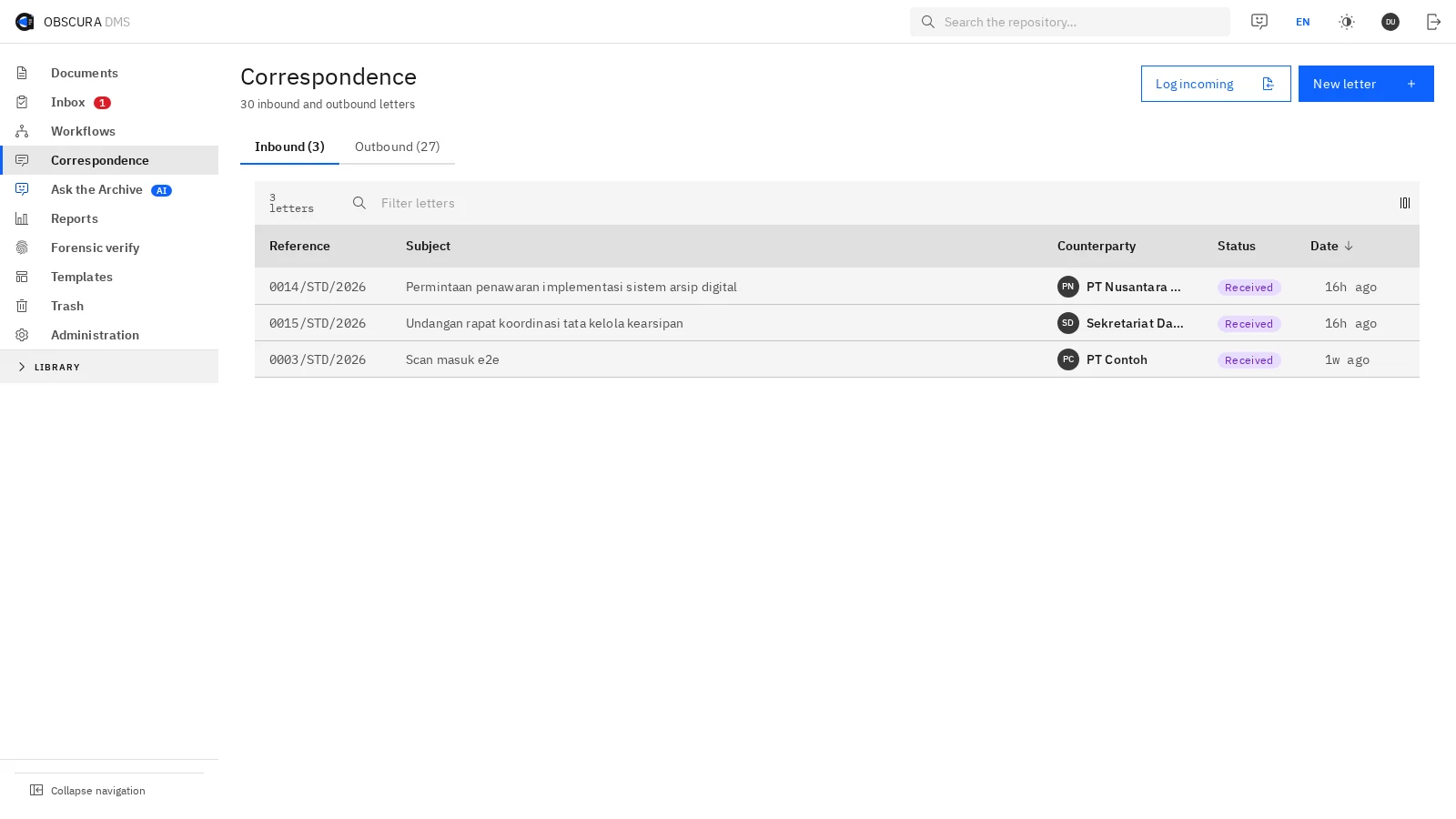
Outgoing letters and the incoming agenda share one register, which you can search by subject, number, agenda, sender or scanned text.
Approvals, seals, disposition and activity stay on the letter itself, so you can trace an instruction back to the decision behind it. Letters marked confidential follow the document's access rules.

 Sample data
(05)Modules & setup
Before configuration, we agree on the modules, providers, numbering schemes and delivery channels with your team.
- Correspondence module
The Correspondence module is licensed separately from the core document management system.
- e-sign module
Signing, e-Meterai and digital seals need the e-sign module, and certified signing and e-Meterai also need a configured provider.
- Office module
Writing letters as Word files needs the Office module, and without it the built-in rich-text editor is available.
- Filing
Filing follows predefined conventions, which administrators cannot currently change in the application.
(06)Next step
Choose one letter your departments send every week, and we will run it through Obscura with you.
We will look at the manual work it takes today, how clear the responsibility is at each step and what evidence you have at the end. Those measures then shape a useful pilot.